

Does it pose a security risk to tap your smartwatch? In most everyday situations, tapping a modern smartwatch against a contactless payment terminal is considered a relatively secure way to pay. Technologies such as NFC are specifically designed for short-range communication, while modern payment systems use security measures such as device authentication, tokenization and transaction-specific security codes.
However, that does not mean a smartwatch is completely risk-free.
Your smartwatch is a small connected computer sitting on your wrist. Depending on the model, it may have NFC, Bluetooth, Wi-Fi, GPS, microphones, sensors, apps, notifications and access to payment credentials. That makes smartwatch security more complicated than simply asking whether “tapping” is safe.
The good news is that the biggest risks are usually not someone magically stealing your bank card simply because your watch touched a payment terminal. More realistic threats include using an insecure watch, installing malicious apps, falling for phishing attempts, losing an unlocked device, interacting with an unknown NFC tag, or exploiting vulnerabilities in outdated software.
So, does it pose a security risk to tap your smartwatch? Usually, the answer is low risk when you’re using a legitimate payment system on a properly secured and updated smartwatch. But understanding how the technology works can help you avoid the situations that actually create risk.
What Happens When You Tap Your Smartwatch?
To understand the security question, it helps to understand what happens during a typical contactless transaction.
Most smartwatch payment systems use Near Field Communication (NFC). NFC is a short-range wireless technology that allows compatible devices to communicate when they are brought very close together.
When you hold your smartwatch near a compatible payment terminal, the watch communicates with the terminal over NFC. This is fundamentally different from connecting to a distant Wi-Fi network or Bluetooth device.
EMVCo, the global payments technology standards organization, specifically includes smartwatches and other wearable devices in its mobile contactless payment ecosystem. Wearables can undergo approval and security evaluation processes designed for NFC-based payments.
The important point is that your actual bank-card number generally isn’t simply broadcast to the payment terminal.
Modern payment systems can use payment tokenization, which replaces the underlying card number with a payment token that is constrained for particular devices, merchants or transaction scenarios. This reduces the value of stolen payment information to an attacker.
Apple provides a useful example. Apple Pay on Apple Watch uses a device-specific account number and a transaction-specific security code rather than sending the actual card number to the merchant.
Google Wallet similarly requires supported hardware, NFC and appropriate security controls for smartwatch payments. Google states that modified, rooted or otherwise unsupported watches may be blocked from contactless payments because they don’t meet its security requirements.
Is NFC on a Smartwatch Safe?
For normal contactless payments, NFC is generally designed with a very short communication range.
That short range is an important security characteristic.
An attacker typically cannot simply stand across a room and read everything from your smartwatch through NFC. The devices need to be brought close enough for communication to take place.
EMVCo describes NFC as part of the technology used for contactless payments involving smartphones and wearable devices.
But “short range” does not mean “impossible to attack.”
Security researchers have investigated attacks against contactless systems, including relay-style attacks in which an attacker attempts to extend communication between legitimate devices. These attacks are considerably more complicated than simply putting a phone near someone’s wrist, but they demonstrate why payment systems use multiple layers of security rather than relying on NFC’s short range alone.
The important distinction is:
NFC itself is not the entire security system.
The security of a smartwatch payment depends on the combination of:
- NFC communication
- Payment tokenization
- Device security
- User authentication
- Secure hardware
- Payment-network controls
- Fraud monitoring
- Software updates
- The security of the apps and operating system
That’s why a modern smartwatch payment system can be much safer than the simple idea of “my watch sends my card number when I tap it.”
Can Someone Steal Your Card Details by Tapping Your Smartwatch?
This is one of the most common concerns.
In a properly implemented mobile-payment system, simply placing another NFC device next to your smartwatch should not give an attacker your complete physical card number.
For example, Apple explains that Apple Pay uses a Device Account Number and a unique security code for transactions rather than sending the actual card number to the merchant. The transaction security code is designed to be specific to the transaction.
EMVCo’s payment-tokenization system is based on a similar security principle: replacing the primary account number with a constrained payment token.
This means that the common scenario of:
“Someone walks past me, taps my smartwatch, and copies my bank card.”
is not an accurate description of how modern smartwatch payments normally work.
That doesn’t mean fraud is impossible. It means the attack would have to overcome additional security mechanisms.
What Are the Real Security Risks of a Smartwatch?
The more useful question isn’t simply whether tapping is safe.
It’s:
What can actually go wrong when you use a smartwatch?
Here are the risks worth understanding.
1. Losing Your Smartwatch
Physical theft is one of the most realistic risks.
Your smartwatch may contain notifications, messages, health-related information, contact details, authentication data and payment capabilities.
If you leave it unsecured, someone who obtains the watch may have opportunities to access information or attempt transactions, depending on the device’s security configuration.
This is why you should always use a passcode or other supported authentication mechanism.
Apple, for example, requires a passcode for Apple Pay on Apple Watch, and Apple Watch security features can automatically lock the device when it is removed from the wrist when Wrist Detection is enabled.
2. Malicious or Fake Apps
Your smartwatch is still a computing device.
Installing an application from an unreliable source can introduce security problems, particularly on platforms that support third-party applications.
A malicious application may attempt to abuse permissions, collect information, display fraudulent content or interact with other services connected to your device.
For this reason, download apps from official stores whenever possible and pay attention to the permissions an application requests.
An app that asks for access to information it clearly does not need should raise a red flag.
3. Phishing Through Notifications
This is an underrated smartwatch security risk.
A smartwatch may display messages, emails, authentication prompts and links from your phone.
That convenience can also make phishing easier.
Imagine receiving a notification saying:
“Your bank account has been locked. Tap here to verify.”
A small watch screen can make it harder to inspect the full URL, sender details or context.
The problem isn’t necessarily the smartwatch’s NFC system. The problem is social engineering.
The safest approach is to avoid opening suspicious links from notifications. Instead, open the official banking or service application yourself.
4. Outdated Software
Like smartphones and computers, smartwatches can contain software vulnerabilities.
Manufacturers periodically release security and firmware updates to fix bugs and vulnerabilities.
Ignoring those updates for months can leave a device exposed to problems that have already been addressed by the manufacturer.
This is particularly important if your smartwatch connects to sensitive services such as payment applications, email accounts or authentication systems.
5. Unofficial or Modified Software
Security can become significantly more complicated if you modify the operating system.
Rooting, unlocking bootloaders, installing unofficial firmware or running modified software can weaken the security model of the device.
Google explicitly notes that Google Wallet may not work on watches that are rooted, use custom ROMs, run developer versions of Wear OS or have an unlocked bootloader because those configurations may not meet its security requirements.
If you use your smartwatch for payments, keeping the manufacturer’s original security configuration is usually the safer choice.
6. Unknown NFC Tags
Not every NFC interaction is a payment.
NFC tags can be used for many legitimate purposes, including opening websites, sharing information, launching applications or interacting with smart systems.
The danger comes when you interact with an unknown or suspicious NFC tag and your device performs an action that you didn’t expect.
An NFC tag cannot simply “hack everything” on your smartwatch because you touched it. However, a malicious tag could potentially direct you toward a phishing website or attempt to exploit a vulnerability in software that processes NFC data.
The practical rule is simple:
Don’t automatically trust an NFC interaction just because it requires a tap.
Treat unexpected NFC prompts similarly to unexpected QR codes.
Can Someone Hack a Smartwatch Through NFC?
The short answer is: potentially, but it is not as simple as tapping the watch.
NFC is a communication technology, not a magical security bypass.
For an attack to succeed, there generally needs to be a vulnerability, insecure implementation, malicious application, poorly protected data or another weakness that the attacker can exploit.
Security researchers have studied smartwatch-related attack surfaces beyond payment systems as well. For example, academic research has explored ways smartwatch sensors and microphones could potentially be used as attack channels in specialized scenarios. One 2025 research paper examined the possibility of using smartwatch microphones for ultrasonic covert communication against air-gapped systems.
That type of research is important, but it should not be confused with an everyday NFC payment attack.
There is a huge difference between:
“Researchers demonstrated a specialized attack under controlled conditions”
and
“Someone can steal your information just by tapping your smartwatch.”
Those are not equivalent claims.
What About Contactless Payment Fraud?
Contactless payment fraud can happen, but modern payment systems are designed to reduce the usefulness of stolen payment credentials.
EMVCo’s payment-tokenization technology is specifically designed to reduce the risks associated with compromised primary account numbers. Instead of relying on the actual card number for every transaction, payment systems can use alternative payment credentials that are constrained to specific uses.
Apple’s implementation is another example. Apple states that the Device Account Number stored for Apple Pay is different from the user’s normal card number and is protected within the Secure Element. Transactions also use dynamic security information.
This layered approach means that stealing one piece of information doesn’t automatically give an attacker everything needed to perform unrestricted transactions.
Still, users should monitor their bank accounts and enable transaction alerts.
Technology reduces risk; it does not eliminate the need for good security habits.
Is Tapping Your Smartwatch Safer Than Using a Physical Card?
There isn’t a universal answer because security depends on the payment system and how you use the device.
However, digital wallets can offer security advantages because they can use device-specific credentials, tokenization and authentication.
A physical contactless card, meanwhile, is also designed with security protections and transaction limits depending on the bank and region.
The important comparison isn’t simply:
watch vs card
It is:
properly secured payment system vs poorly secured payment system.
A smartwatch protected by a passcode, updated software and a reputable payment wallet can be a very secure payment method.
A compromised or modified smartwatch with suspicious applications is a different situation.
Apple Watch vs Galaxy Watch Security
Different smartwatch platforms implement security differently, so you should check the manufacturer’s documentation for your exact model.
Apple says Apple Pay transactions on Apple Watch use device-specific payment credentials and transaction-specific security information. Apple also provides mechanisms to suspend payment capabilities if an Apple Watch is lost or stolen.
Wear OS devices using Google Wallet similarly have security requirements. Google states that the watch must meet certain device-security standards for contactless payments and may reject modified or unsupported software configurations.
The broader lesson is more important than the brand:
Use the official payment wallet, keep your device updated, protect it with authentication and don’t modify the operating system unnecessarily.
How to Make Your Smartwatch More Secure
You don’t need to become a cybersecurity expert to significantly improve smartwatch security.
Follow these practical steps.
Use a Strong Passcode
If your smartwatch supports a passcode, use one.
Avoid obvious combinations such as 1234, 0000 or your birth year.
Enable Wrist Detection or Automatic Locking
If your smartwatch supports automatic locking when removed from your wrist, enable it.
This can help prevent someone from immediately using the device after stealing or finding it.
Keep the Operating System Updated
Install official watchOS, Wear OS or manufacturer firmware updates.
Updates can contain important security fixes.
Use Official Payment Applications
Use Apple Pay, Google Wallet, Samsung Wallet or the official payment platform supported by your device and bank.
Avoid unofficial payment applications claiming to provide unsupported functionality.
Don’t Root or Modify the Watch
If payment security is important to you, avoid rooting, custom ROMs and unofficial firmware.
These modifications can weaken security controls and may cause payment applications to stop working.
Be Careful With NFC Tags
Don’t tap unknown NFC tags in random locations just because they are available.
If your watch or phone presents an unexpected website or action after an NFC interaction, stop and examine what it is asking you to do.
Don’t Trust Suspicious Notifications
A smartwatch notification that says “verify your account” does not automatically mean the message is legitimate.
When in doubt, open the official application yourself.
Enable Bank Transaction Alerts
Transaction notifications can help you detect unauthorized activity quickly.
The sooner you notice suspicious activity, the sooner you can contact your bank or card issuer.
Remove Payment Cards From a Lost Watch
If your smartwatch is lost or stolen, use the manufacturer’s device-management or account tools to disable payment capabilities where available.
For example, Apple provides options to put a lost Apple Watch into Lost Mode and suspend its ability to make payments.
What Should You Do If Your Smartwatch Is Lost?
Don’t wait to see whether someone returns it.
Take action immediately.
- Use the manufacturer’s device-finding service.
- Lock the watch remotely if supported.
- Suspend or remove payment cards.
- Contact your bank if you suspect unauthorized transactions.
- Change important account passwords if you believe the watch was compromised.
- Review recent account activity.
- Report the device as lost if appropriate.
The exact steps vary by smartwatch manufacturer.
So, Does It Pose a Security Risk to Tap Your Smartwatch?
Yes, there is some security risk — but ordinary contactless tapping is generally not the biggest risk people should worry about.
For a modern smartwatch using a reputable payment platform, NFC contactless payments are protected by several layers of security.
The system isn’t simply:
Watch → bank card number → payment terminal
Instead, modern payment ecosystems can use device-specific credentials, tokenization, secure hardware, authentication and dynamic transaction security.
EMVCo’s payment-tokenization framework specifically aims to reduce the usefulness of compromised payment credentials, while major wallet providers implement additional device and transaction security mechanisms.
The bigger everyday risks are often:
- Losing an unlocked smartwatch
- Using an insecure passcode
- Installing suspicious apps
- Ignoring software updates
- Clicking phishing links from notifications
- Using modified firmware
- Interacting with suspicious NFC tags
- Failing to monitor payment activity
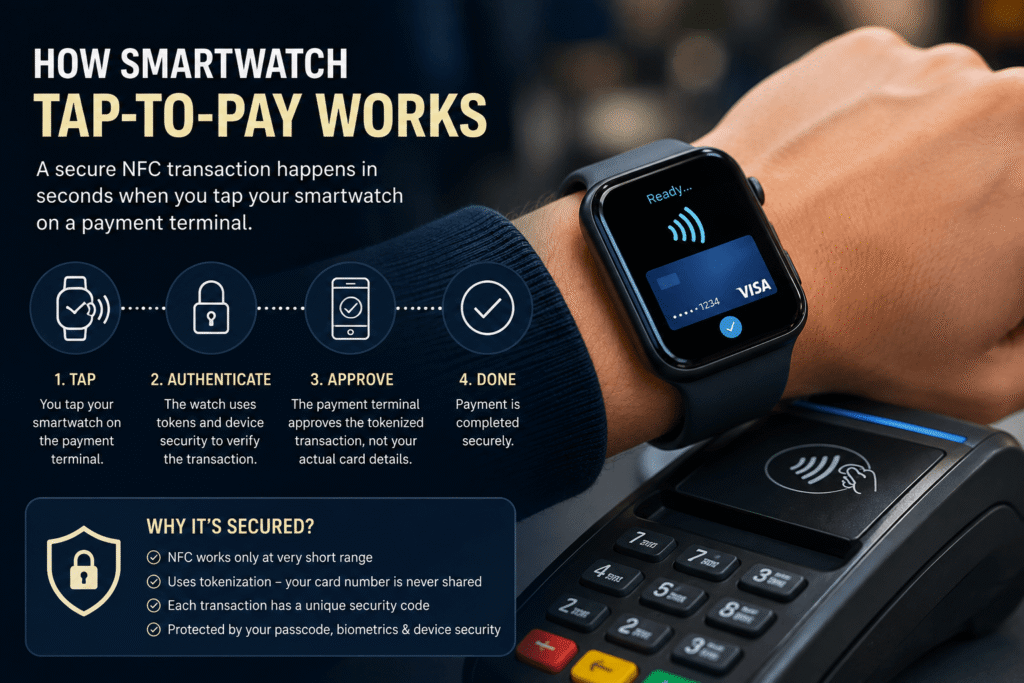
So if you’re using a supported smartwatch, keeping it updated and locked, and paying through an established mobile wallet, there is generally no reason to panic about tapping your watch at a legitimate contactless payment terminal.
Final Verdict
Smartwatch payments are convenient, but convenience doesn’t have to mean sacrificing security.
Does it pose a security risk to tap your smartwatch? Technically, every connected device and wireless communication system has potential security risks. But for normal contactless payments, NFC’s short range is only one part of a much larger security architecture.
Modern payment systems can use tokenization, secure elements, authentication and transaction-specific security credentials to make stolen payment information less useful to attackers.
The smartest approach isn’t to stop using contactless payments.
Instead:
Keep your smartwatch updated. Use a passcode. Enable automatic locking. Use official payment applications. Avoid suspicious NFC tags and links. And monitor your financial accounts.
For more practical technology and cybersecurity explainers, explore the ViravioTech homepage and its Cybersecurity section, where you can find more coverage of digital security, privacy and emerging technology.
The strongest references for this particular article are:
- EMVCo — Payment Tokenisation
- EMVCo — EMV Mobile
- Google — Tap to Pay with Your Smartwatch
- Apple — Apple Pay Payment Authorization Security
Frequently Asked Questions
Can someone steal my card number by tapping my smartwatch?
Normally, no. Modern mobile-payment systems generally use device-specific payment credentials and tokenization rather than simply transmitting your physical card number. Apple, for example, uses a Device Account Number and transaction-specific security information for Apple Pay.
Is smartwatch NFC safe?
For normal supported uses, NFC is generally considered a secure short-range communication technology. The overall security also depends on the smartwatch’s operating system, payment wallet, authentication and software configuration.
Can someone hack my smartwatch by tapping it?
Simply tapping a smartwatch does not automatically give someone access to it. An attacker would generally need to exploit a vulnerability or another weakness in the device, software or communication system.
Should I turn off NFC on my smartwatch?
Not necessarily. If you use contactless payments, NFC is required. Keeping the watch updated, secured with authentication and configured correctly is generally more important than simply disabling NFC.
What happens if my smartwatch is stolen?
Use your manufacturer’s device-finding and security tools immediately. Lock the device, suspend payment functionality where possible and contact your bank if you see suspicious transactions.
Is tapping a smartwatch safer than tapping a physical card?
Both can be secure. Modern smartwatch payment systems can add authentication and tokenization, but security ultimately depends on the device, payment network, bank and how the user protects the device.
Can NFC tags steal money from a smartwatch?
An NFC tag cannot normally cause a payment simply because you touched it. However, an unknown NFC interaction could potentially lead you to a malicious website or exploit a software vulnerability. Treat unexpected NFC prompts with the same caution you would use with unfamiliar QR codes.
What is the biggest smartwatch security risk?
For everyday users, losing an unsecured device, installing malicious software, clicking phishing links and failing to install security updates are generally more practical concerns than someone simply “scanning” the watch through NFC.


